


Instant schedule health checks against the DCMA 14-point standard.
Upload your XER (Primavera P6) or MPP (MS Project) schedule file and receive an instant DCMA 14-point compliance assessment. Clear scoring, visual breakdowns of logic, float, critical path, lags, and constraints, all in one professional report you can hand straight to your client or PMO.
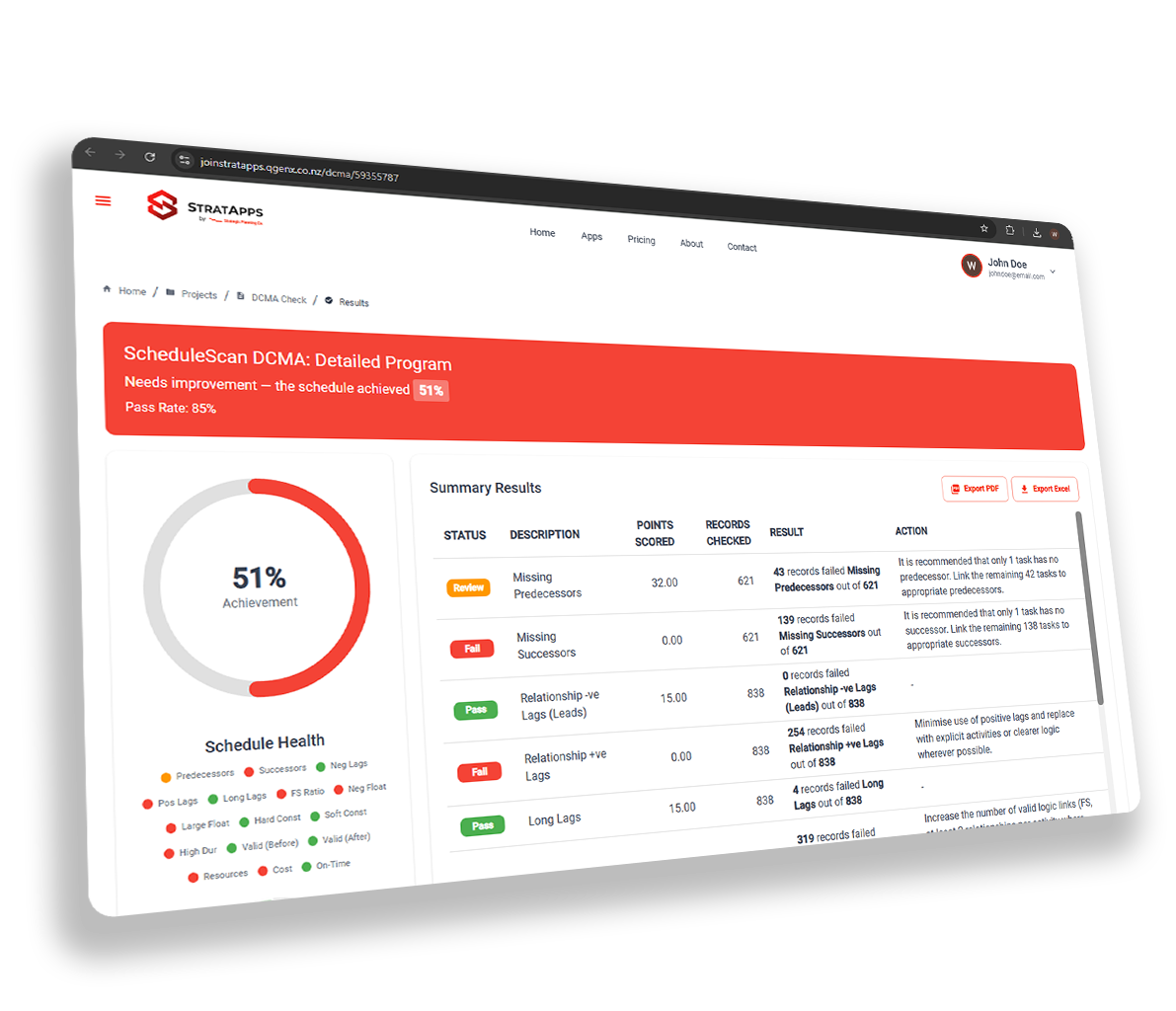
Everything a rigorous schedule review demands
Full 14-Point Assessment
Every DCMA criterion is tested automatically, logic, float, critical path, constraints, lags, missed activities, and more.
Scoring Dashboard
Visual pass/fail scorecard with percentage compliance per criterion, instantly shows where the schedule falls short.
Logic & Float Analysis
Detailed breakdown of missing logic, open ends, negative float, excessive total float, and free float anomalies.
PDF Report Export
Generate a professional schedule health report in one click, ready to share with clients, PMOs, or review panels.
Consistent Reviews
Eliminate reviewer bias. Every schedule is assessed against the same criteria, every time, reproducible and defensible.
Revision Tracking
Upload multiple schedule revisions and compare how the health score has improved, or deteriorated, over time.
All 14 DCMA criteria, automatically
Upload. Assess. Report.
Upload your schedule
Import your XER (Primavera P6) or MPP (MS Project) file directly into the checker.
Automated assessment
ScheduleScan runs all 14 DCMA checks in seconds, scoring each criterion and flagging non-compliant activities.
Download your report
Export a scored, formatted PDF schedule health report, ready to submit to your client, PMO, or peer reviewer.
Why this beats everything else
Manual DCMA checks
Reviewing all 14 criteria by hand takes planners hours. Mistakes get through and coverage is inconsistent.
Peer review bottleneck
Waiting on a senior planner to eyeball a schedule before every submission slows the whole programme down.
No audit trail
Two planners checking the same schedule often reach different conclusions. Nothing is documented or repeatable.
All 14 criteria in seconds
Automated checks run the moment you upload. No manual counting, no missed criteria, no guesswork.
Consistent every time
The same logic runs on every schedule. Results are repeatable, documented, and defensible.
Report generated automatically
A formatted PDF schedule health report is ready immediately, attach it straight to your submission.
One upload. Fourteen checks. A report your client can rely on.
For anyone responsible for schedule quality
Run your first schedule check today
Register for free on the StratApps platform, no credit card required.